Toxic Movie Poster Editing Prompts 2026 | Best Prompts
ByRaja Soni
If you want to turn your photo into a bold movie poster, Toxic Movie Poster Editing Prompts 2026 can help you create a dark and cinematic look. These prompts work well with AI photo editing tools such as Gemini and other image editors.
You can use them to add dramatic lighting, stylish outfits, movie-style backgrounds, and powerful poster effects while keeping your face natural. On Prompt Seen you can get all the latest Photo Editing Prompts.
What Are Toxic Movie Poster Editing Prompts?
Toxic movie poster prompts are ready-to-use AI instructions that help you create a dark, stylish, and cinematic poster from your photo.
You can copy a prompt, upload your photo, and paste the prompt into your AI editing tool. The AI then uses your image as the main subject and applies the requested movie-poster style.
Why Are Toxic Movie Poster Prompts Trending?
Movie-style AI edits are popular because they let you turn an ordinary portrait into something that looks like a professional film poster.
The dark colors, dramatic lighting, stylish outfits, smoke, and cinematic backgrounds can make your photo look more powerful. You can also use the final image for social media posts, profile pictures, wallpapers, or creative projects. Also check: Raksha Bandhan AI Photo Editing Prompts & Sabki Apni Apni Aaankhe Photo Editing Prompt.
Best Toxic Movie Poster Editing Prompts 2026
Here are some prompts you can try.
AI Prompt
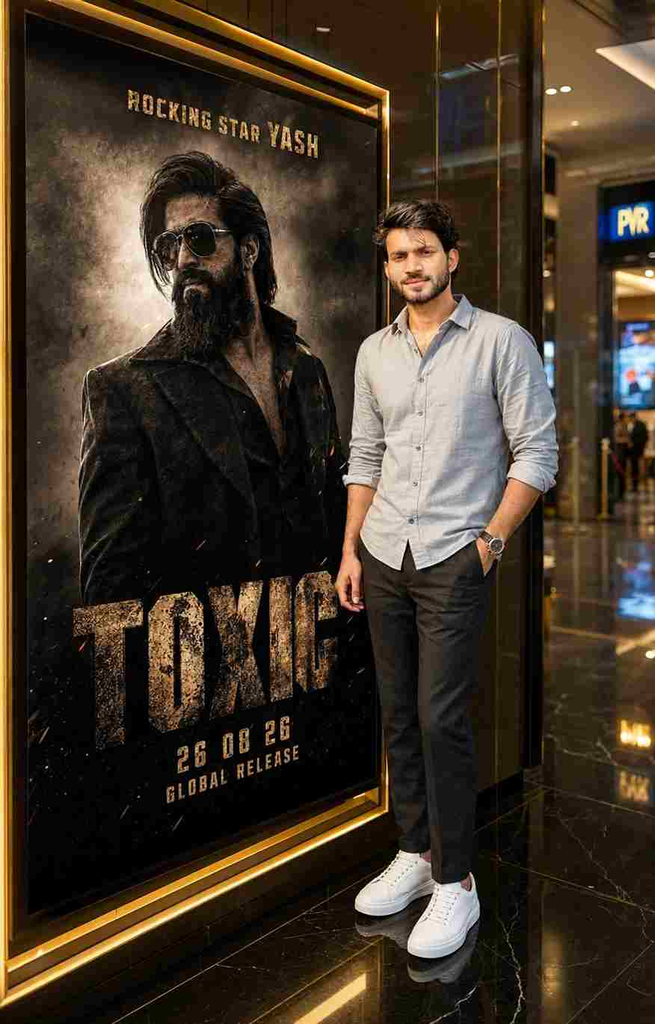
Create an ultra-realistic cinematic photo of the SAME person from the uploaded reference, preserving exact facial identity, hairstyle, skin tone, beard, age, and body proportions. Place him in a luxurious modern cinema lobby at night, standing on the RIGHT beside a large illuminated black-and-gold movie poster on the LEFT. He wears a light grey-blue rolled-sleeve shirt, dark trousers, white sneakers, and a watch, with one hand in his pocket and a natural smile.
The poster prominently features Yash as a rugged action hero in dark clothing and sunglasses, with dramatic smoke, sparks, dust, and cinematic lighting. No guns, weapons, blood, injuries, or graphic violence. Add the title “TOXIC”, “ROCKING STAR YASH,” “26 08 26”, and “GLOBAL RELEASE.” Luxury black marble, golden trims, glossy floors, warm lighting, subtle blue cinema signage, DSLR photography, realistic skin texture, shallow depth of field, 4:5 vertical composition, authentic cinematic look.
AI Prompt
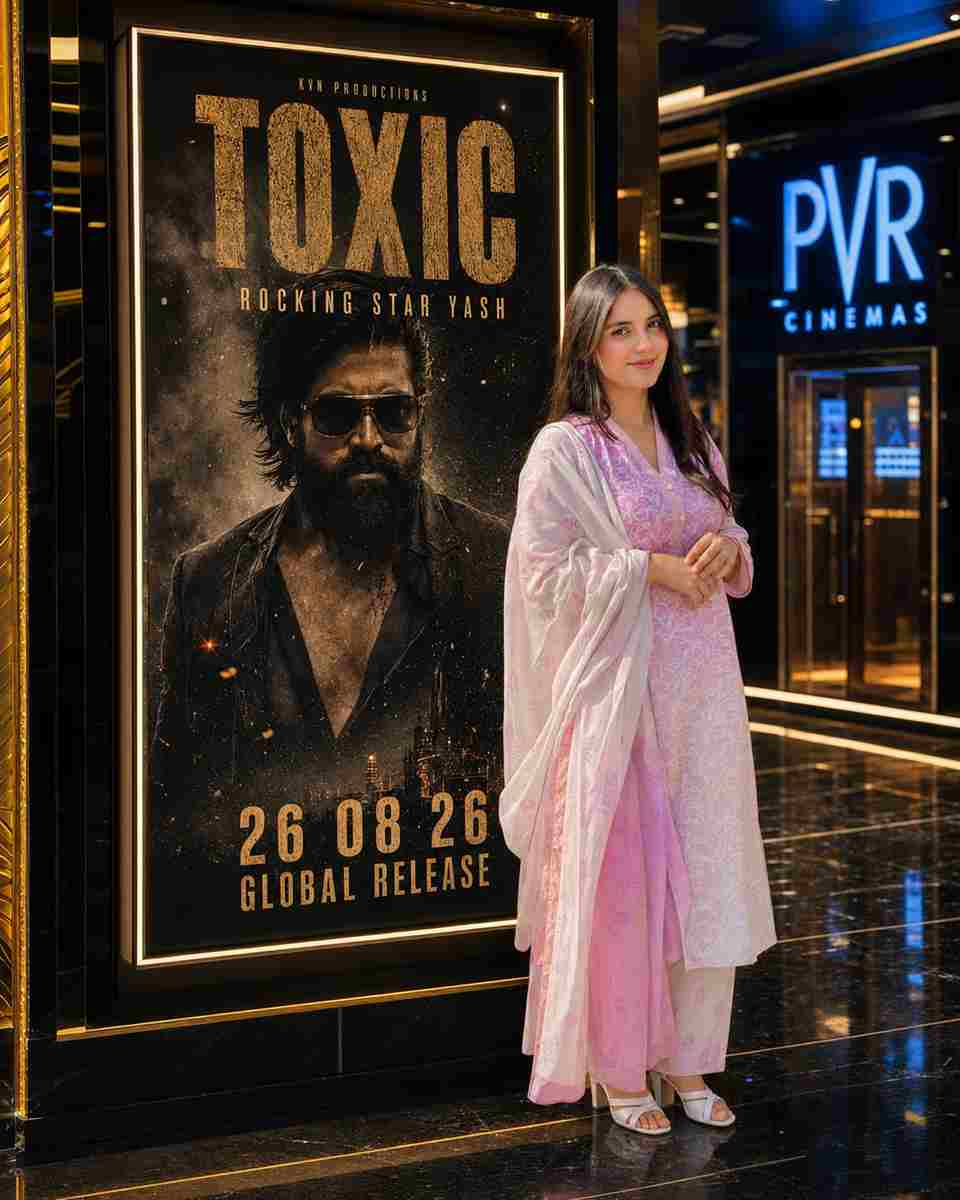
Create an ultra-realistic cinematic photo of the SAME girl from the uploaded reference, preserving her exact facial identity, facial structure, skin tone, hairstyle, age, and body proportions. Place her standing confidently on the RIGHT beside a large illuminated black-and-gold movie poster on the LEFT inside a luxurious modern cinema lobby at night. She wears the same clothes as in the uploaded image, with one hand in her pocket and a natural, confident smile.
The poster prominently features Yash as a rugged action hero in dark clothing and sunglasses, surrounded by dramatic smoke, sparks, dust, and cinematic lighting. No guns, weapons, blood, injuries, or graphic violence. Add the text “TOXIC”, “ROCKING STAR YASH”, “26 08 26”, and “GLOBAL RELEASE” clearly on the poster. Add luxury black marble, golden trims, glossy reflective floors, warm cinematic lighting, subtle blue cinema signage, realistic skin texture, DSLR photography, shallow depth of field, premium cinematic color grading, ultra-detailed photorealistic quality, and a 4:5 vertical composition.
How to Create a Toxic Movie Poster
You can create your poster in a few simple steps:
Choose a clear portrait photo.
Open your preferred AI photo editing tool.
Upload your photo.
Copy one of the prompts above.
Paste the prompt into the AI tool.
Generate the image.
Try another prompt if you want a different style.
For better results, use a photo where your face is clearly visible and well-lit.
Tips for Better Results
Use these simple tips when creating your poster:
Choose a high-quality photo.
Keep your face clearly visible.
Use a simple background when possible.
Ask the AI to preserve your identity.
Try dark, red, green, or smoky lighting.
Use cinematic words such as thriller, dramatic, realistic, and movie poster.
Generate multiple versions and choose your favorite.
Conclusion
Toxic Movie Poster Editing Prompts 2026 give you an easy way to create dark and cinematic AI photos. You do not need advanced editing skills. Just upload your photo, copy a prompt, and let the AI create the movie-style effect. Try different outfits, backgrounds, lighting, and moods to create a poster that matches your style.
Raksha Bandhan is a special festival that celebrates the bond between brothers and sisters. In 2026, you can use AI photo editing tools to create beautiful Raksha Bandhan photos without complicated editing skills. With the right Raksha Bandhan AI photo editing prompts, you can transform a normal photo into a festive portrait. You can add…
Navratri is a special time for colorful outfits, traditional jewelry, festive makeup, and beautiful nail designs. If you are preparing for Navratri celebrations in 2026, bridal nail art can add an extra touch of beauty to your overall look. AI photo editing tools make it easier to explore different nail art designs before choosing your…
Birthdays are special moments that deserve beautiful photos. You can now turn your simple birthday picture into a stylish and creative photo with AI photo editing prompts. With the right prompt, you can change the background, lighting, outfit, decorations, colors, and overall mood of your photo while keeping your face natural. These Birthday Special AI…
Some photos look beautiful, but a dreamy aesthetic can make them feel truly magical. Soft pastel shades, glowing sunlight, delicate flowers, misty backgrounds, and cinematic effects are popular choices for creating wallpapers that stand out. With the right AI photo prompt, you can transform an ordinary picture into a stunning image that feels artistic while…
The Dark Aesthetic Music Player Photo Editing Prompt is trending among creators who want to turn a normal portrait into a stylish, emotional, and cinematic music-themed photo. This editing style combines a dark background, music player interface, album artwork, song details, and moody lighting to create a modern social media look. Visit Prompt Seen for…
Natural lighting can make or break an AI-generated image. A balanced mix of soft clouds and warm sunlight creates realistic depth, beautiful shadows, and lifelike colors. Whether you use ChatGPT, Midjourney, Flux, Stable Diffusion, or any AI image generator, the right prompt helps produce professional-looking results. You can get all the latest prompts on Prompt…