Viral Sheru Bhai AI Photo Editing Prompt 2026 | Google Gemini
ByRaja Soni
What if your simple selfie could look like a powerful character from a Bollywood action movie? Imagine yourself wearing a stylish black outfit, standing confidently in a cinematic location, with dramatic lighting and a royal attitude. You don’t need a professional camera or an expensive photoshoot to get this look anymore!
The Sheru Bhai AI Photo Editing Prompt 2026 is a fun trend for people who want to give their ordinary pictures a bold makeover. With Google Gemini, you can use simple text prompts to create attractive portraits with different outfits, poses, and backgrounds.
Whether you want a gangster look, a luxury lifestyle portrait, or a powerful village-style photo, these prompts can help you create your favourite style. Let’s explore some amazing prompts by prompt seen and learn how to use them.
What Makes Sheru Bhai AI Photo Editing Special?
The Sheru Bhai editing trend is all about confidence, personality, and cinematic photography. It gives your regular pictures a completely different appearance through AI-generated backgrounds, clothing styles, and lighting effects.
You can create a portrait with a serious expression, a stylish outfit, or a dramatic movie-inspired atmosphere. The final look depends on the instructions you provide to Google Gemini.
You also don’t need to understand complicated editing software. A clear photo and a well-written prompt are enough to get started.
Popular Sheru Bhai AI Photo Editing Styles
Before choosing a prompt, check out these popular styles you can try:
Gangster Personality: A dark outfit, serious expression, and cinematic atmosphere.
Luxury Lifestyle: Designer clothing, expensive-looking surroundings, and premium photography.
Desi Sheru Bhai Look: Traditional clothes with a confident personality.
Action Movie Style: Dramatic lighting and powerful movie-inspired backgrounds.
Royal Portrait: Elegant clothing, warm lighting, and a luxurious setting.
Best Sheru Bhai AI Photo Editing Prompts for Gemini
AI Prompt
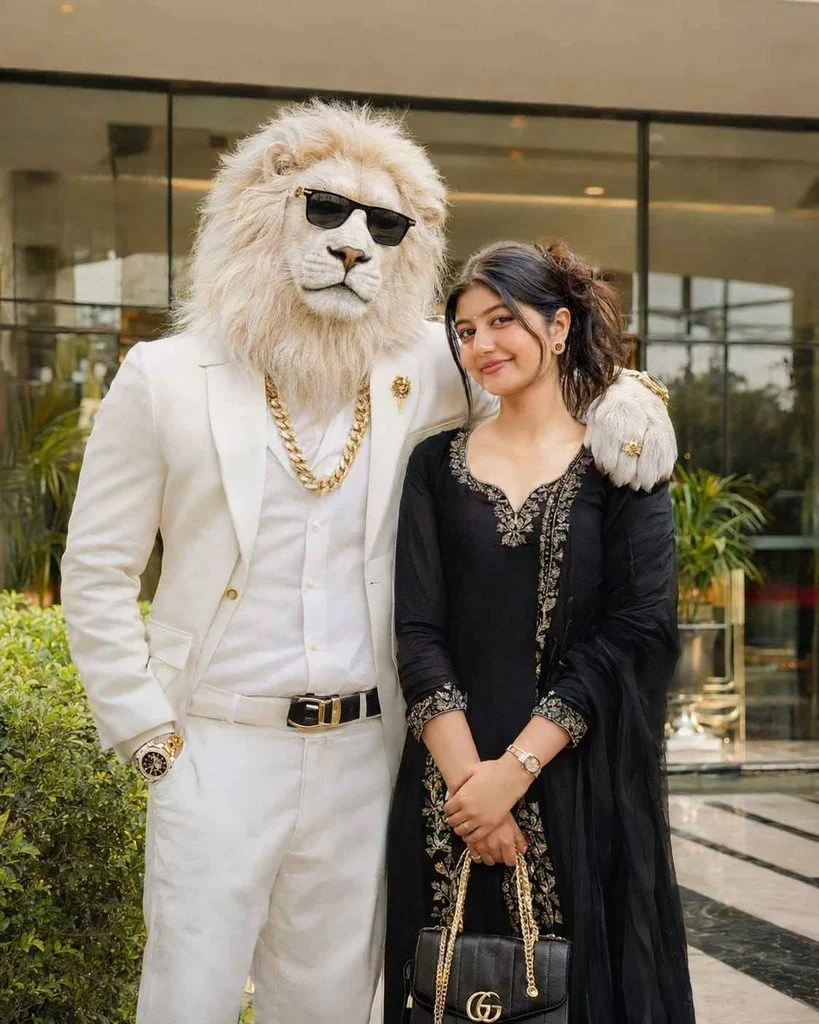
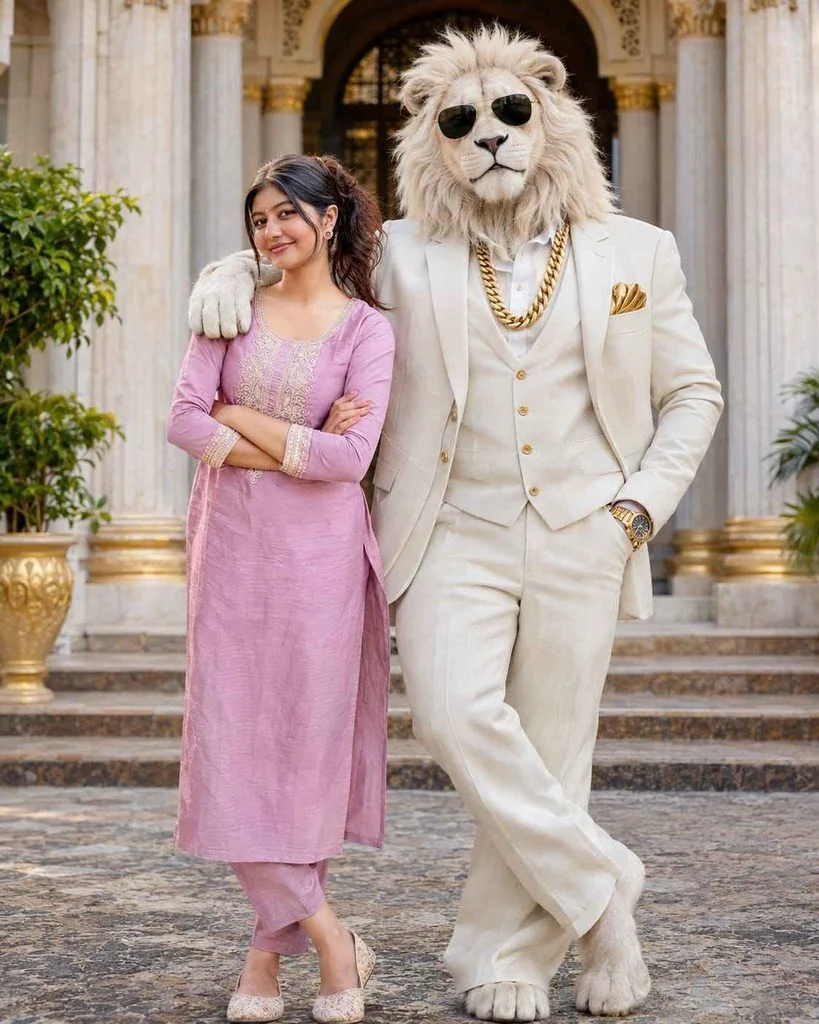
Create an ultra-realistic cinematic DSLR photograph of me standing beside a majestic white lion-headed humanoid character.
MY LOOK: Preserve my original face, facial features, hairstyle, skin tone and identity 100%. I am wearing an elegant premium black dress, stylish heels, delicate golden jewellery, a beautiful handbag and a luxury wristwatch. Give me a natural, charming smile with elegant styling.
WHITE LION: A tall, majestic humanoid white lion with extremely realistic white furry face, a royal personality, stylish black sunglasses, premium white formal suit, white shirt, heavy golden chain, golden wristwatch and luxury golden accessories.
POSE: The lion stands beside me with one arm naturally placed around my shoulder like my best friend. I stand confidently beside the lion, smiling naturally at the camera.
LOCATION: Luxury modern hotel entrance with beautiful glass architecture, decorative greenery and warm cinematic lighting.
PHOTOGRAPHY: Professional DSLR photography, realistic skin texture, detailed white lion fur, cinematic depth of field, natural shadows, sharp facial details, premium color grading, ultra-HD 8K quality.
STRICT IDENTITY LOCK: Use my uploaded reference photo and preserve my original identity 100%. Do not modify, replace or reshape my facial features.
Make it look like a genuine professional photograph, not an AI-generated image.
Aspect ratio: 4:5..
AI Prompt
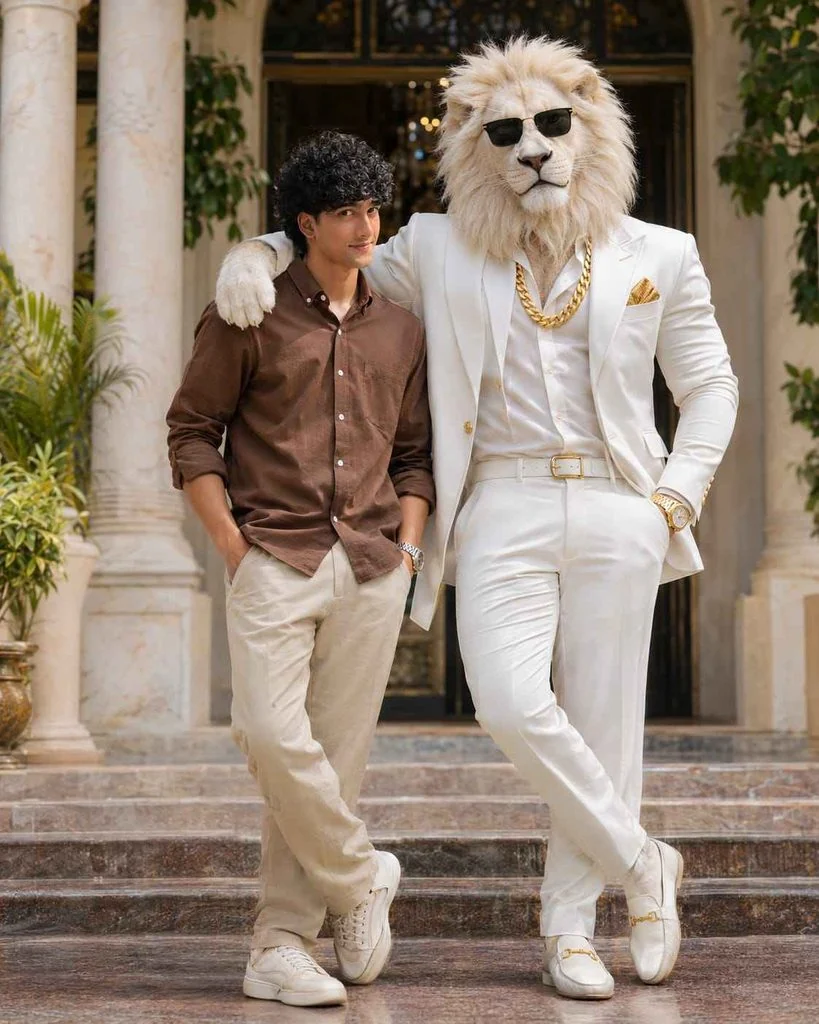
Create an ultra-realistic cinematic 8K DSLR full-body portrait using my uploaded photo as the STRICT FACE AND OUTFIT REFERENCE. Preserve my exact original facial identity, face shape, skin tone, curly black hairstyle, eyes, eyebrows, nose, lips, teeth, moustache, beard, natural smile and body proportions with 100% accuracy. Keep my original black, white and grey checked shirt EXACTLY the same, including its pattern, colours, collar, buttons, sleeves and fit. Do not change my clothing or accessories. Show me standing confidently beside a majestic, giant, ultra-realistic white lion with a thick cream-white mane. The lion stands on my left side with one front paw naturally resting on my shoulder. The lion wears a premium white royal formal suit, heavy golden chain, golden wristwatch, golden pocket square and stylish black sunglasses. Both face the camera with confident expressions. Place us at a luxurious royal palace entrance featuring elegant cream marble pillars, beautiful architecture and soft green plants. Professional cinematic photography, 85mm DSLR lens, f/1.8, natural lighting, realistic shadows, sharp facial details, detailed fur texture, realistic anatomy, premium Instagram photography, cinematic colour grading and beautiful depth of field. ABSOLUTE PRIORITY: My original face and checked shirt must remain unchanged. Only add the white lion and replace the background. Do not generate a different face, hairstyle or outfit. No text, no logos, no watermark. Vertical 4:5 composition, ultra-realistic 8K quality..
AI Prompt
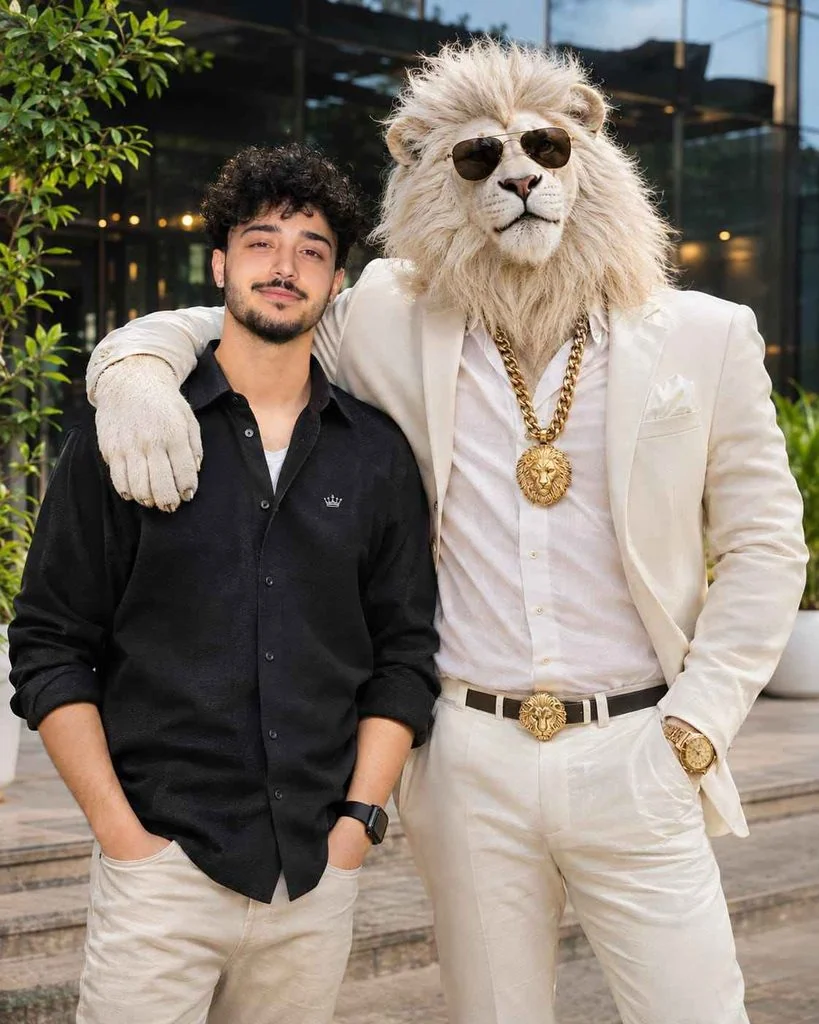
Create an ultra-realistic cinematic DSLR photograph of me standing beside a majestic white lion-headed humanoid character.
**MY LOOK:** Preserve my original face, facial features, hairstyle, skin tone and identity 100%. I am wearing a premium black oversized shirt, beige trousers, stylish sneakers and a luxury wristwatch. Give me a natural, confident smile.
**WHITE LION:** A tall, muscular humanoid white lion with extremely realistic white fur, a royal personality, stylish black sunglasses, premium white formal suit, white shirt, heavy golden chain, golden wristwatch and luxury golden accessories.
**POSE:** The lion stands beside me with one arm naturally placed around my shoulder like my best friend. Both of us are looking directly at the camera with confident expressions.
**LOCATION:** Luxury modern hotel entrance with beautiful glass architecture, greenery and warm cinematic lighting.
**PHOTOGRAPHY:** Professional DSLR photography, realistic skin texture, detailed lion fur, cinematic depth of field, natural shadows, sharp focus, premium color grading, ultra-HD 8K quality.
STRICT IDENTITY LOCK: Use my uploaded reference photo and preserve my original identity without changing or replacing my face.
Make it look like a genuine professional photograph, not an AI-generated image.
Aspect ratio: 4:5..
AI Prompt
Create an ultra-realistic cinematic 8K DSLR full-body portrait of me standing beside a majestic, giant, ultra-realistic white lion with a thick, luxurious cream-white mane. Use my uploaded photo as the STRICT FACE, IDENTITY AND OUTFIT REFERENCE. Preserve my exact original female facial identity, face shape, skin tone, hairstyle, hair colour, eyes, eyebrows, nose, lips, teeth, natural smile and body proportions with 100% accuracy. Keep my original outfit EXACTLY the same as in the uploaded photo, including its colours, pattern, design, fabric, neckline, sleeves, fitting and accessories. Do not change, replace or redesign my face, hairstyle, body or clothing. The majestic white lion stands on my left side with one front paw naturally resting gently on my shoulder. The lion wears a premium white royal formal suit, heavy golden chain, luxurious golden wristwatch, golden pocket square and stylish black sunglasses. Both of us face the camera with confident, natural expressions. Place us at a luxurious royal palace entrance featuring elegant cream marble pillars, beautiful royal architecture and soft green plants. Professional cinematic photography, 85mm DSLR lens, f/1.8 aperture, natural lighting, realistic shadows, extremely sharp facial details, detailed realistic white fur, anatomically accurate bodies, premium Instagram photography, cinematic colour grading and beautiful depth of field. ABSOLUTE PRIORITY: My original face, hairstyle, skin tone and outfit must remain 100% unchanged. Only add the white lion and replace the background. No text, no logos, no watermark. Vertical 4:5 composition, ultra-realistic 8K quality..
How to Generate Sheru Bhai Photos Using Google Gemini?
Creating these images is easier than you might think. You only need your smartphone or computer and a clear picture.
Select a photo where your face is clearly visible. Avoid blurry images or pictures with too many objects covering your face.
Step 3: Select Your Favourite Style
Read the prompts above and choose the look you want. You can select a luxury car photoshoot, black suit portrait, or desi attitude style.
Step 4: Upload and Paste the Prompt
Upload your original picture to Gemini and paste the complete editing instructions into the chat box.
Step 5: Generate the AI Image
Submit your request and wait for Gemini to create your image. If something looks wrong, give Gemini another instruction to improve the result.
Step 6: Save Your Favourite Result
Once you get the desired image, save it to your device. You can now use it as your profile picture or share it on social media.
Best Settings for Realistic AI Photo Editing
Your prompt matters, but the details you include can also affect the final result.
Editing Element
Recommended Choice
Image Quality
High resolution
Lighting
Natural or cinematic
Camera Style
DSLR portrait
Background
City, studio, or village
Outfit
Black suit or traditional dress
Facial Details
Original face preservation
Image Style
Photorealistic
Common Mistakes to Avoid When Using AI Prompts
Sometimes, the generated image may not look like your original picture. Here are some mistakes to avoid:
Using blurry pictures: Always upload a clear image with good lighting.
Writing confusing prompts: Explain the outfit, background, and pose in simple words.
Adding too many effects: Too many visual instructions can make the image look unnatural.
Ignoring facial details: Clearly mention that your original facial identity must remain unchanged.
Choosing random backgrounds: Describe the exact location or environment you want.
Not checking the result: Review the generated image before saving or sharing it.
How to Make Your Sheru Bhai Pictures Go Viral?
Creating a good picture is only the first step. You can also make your social media post more attractive with a few simple ideas.
Use a short and catchy caption.
Select a trending background song.
Share your picture as an Instagram Reel or story.
Use relevant hashtags such as #SheruBhai #AIEdits #GoogleGemini.
Choose a clean profile picture with a visible face.
Try different AI styles instead of posting the same type of photo.
Final Thoughts
The Viral Sheru Bhai AI Photo Editing Prompt 2026 makes it easy to experiment with different looks without spending money on a professional photoshoot. From black suit portraits to luxury car photography, Google Gemini gives you plenty of creative possibilities.
Start with your favourite prompt, upload a clear picture, and try different styles until you get the look you want. A little creativity can turn an ordinary selfie into an eye-catching AI portrait!
Navratri is a special time for colorful outfits, traditional jewelry, festive makeup, and beautiful nail designs. If you are preparing for Navratri celebrations in 2026, bridal nail art can add an extra touch of beauty to your overall look. AI photo editing tools make it easier to explore different nail art designs before choosing your…
The Anime Flashlight AI Photo Editing Prompt 2026 is a creative way to transform a normal portrait into a dramatic, anime-inspired image. This trend combines a dark environment with a powerful flashlight beam, glowing highlights, cinematic shadows, and detailed anime-style visuals. You can create this look with AI tools such as ChatGPT and Gemini. Just…
AI video editing is taking social media by storm in 2026, especially for funny and entertaining video creations. From hilarious character transformations to unexpected comedy scenes, people are using AI tools to turn simple ideas into amazing videos. The funny AI video trend is perfect for anyone who wants to create entertaining content for TikTok,…
Sometimes a portrait does not need a complete makeover. A better background, the right lighting, and a little cinematic atmosphere can be enough to change the entire feel of a photo. This is exactly why cinematic portrait editing has become a popular AI photo trend. You can place your portrait in a dramatic city, a…
Want to create a patriotic AI photo for 14 August or any Independence Day celebration? You only need a detailed prompt. A good prompt helps AI generate realistic images with the right colours, outfits, lighting, and national spirit. What Is an Independence Day Special Photo Prompt? An Independence Day Special Photo Prompt is a detailed…
Natural lighting can make or break an AI-generated image. A balanced mix of soft clouds and warm sunlight creates realistic depth, beautiful shadows, and lifelike colors. Whether you use ChatGPT, Midjourney, Flux, Stable Diffusion, or any AI image generator, the right prompt helps produce professional-looking results. You can get all the latest prompts on Prompt…